 Solution 08 · PrivatActions
One board for every open item, live on every device
Whatever arrives by mail, chat, calendar, meeting or assistance system is collected and prioritised in one single place. Every surface reads the same state and changes it through the same interface: the browser and the app on the desk, the phone in your hand, the automations in the background, and soon the voice assistant on the line as well. A tick is a tick everywhere, in the same moment.
The state lives in a core on your own infrastructure, rather than as a copy on each device. Synchronisation does not disappear because it runs faster. It disappears because there is only one place left where an item gets completed.
In use today
- Board in the browser and as a Mac app, with notifications and menu bar
- Priority with a reason on every item
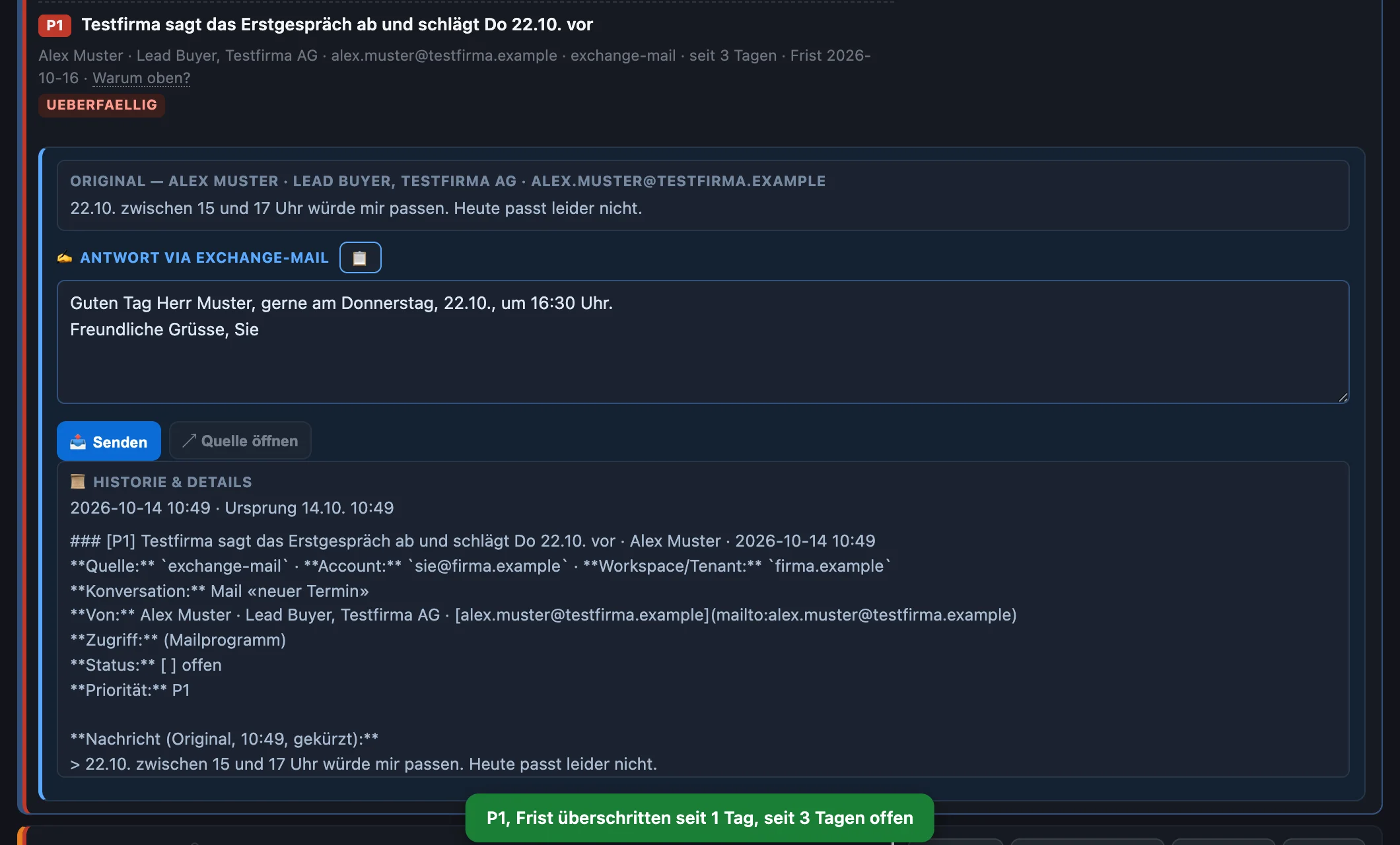
- Review a reply suggestion, adjust it and send it directly
- Cross-check: evidence for completed items, you confirm
- Follow-ups, chasing, discarding with a reason
- Voice assistant on the phone reads out the same board and ticks items off directly in the core
- Every status change written back into the knowledge store
- Board on the iPhone with every action, including note, set aside and discard
Four lists, four versions of the truth
Open items appear in every channel: a mail with a deadline, a question in a chat, a commitment made in a meeting, a follow-up from last quarter. Whoever collects them usually collects them more than once. And as soon as two lists carry the same item, neither of them can be trusted. This is a question of construction rather than discipline: as long as every surface keeps its own copy, reconciliation never ends.
One board: what is due, why, and who is working on it
The board shows the open items in rank order, with their class, the signals that moved them up, and the actions that are booked immediately. At the top sits whatever needs a cross-check, then the escalations, the priorities of the day and the remaining items. Anything another surface is working on right now is visibly locked.
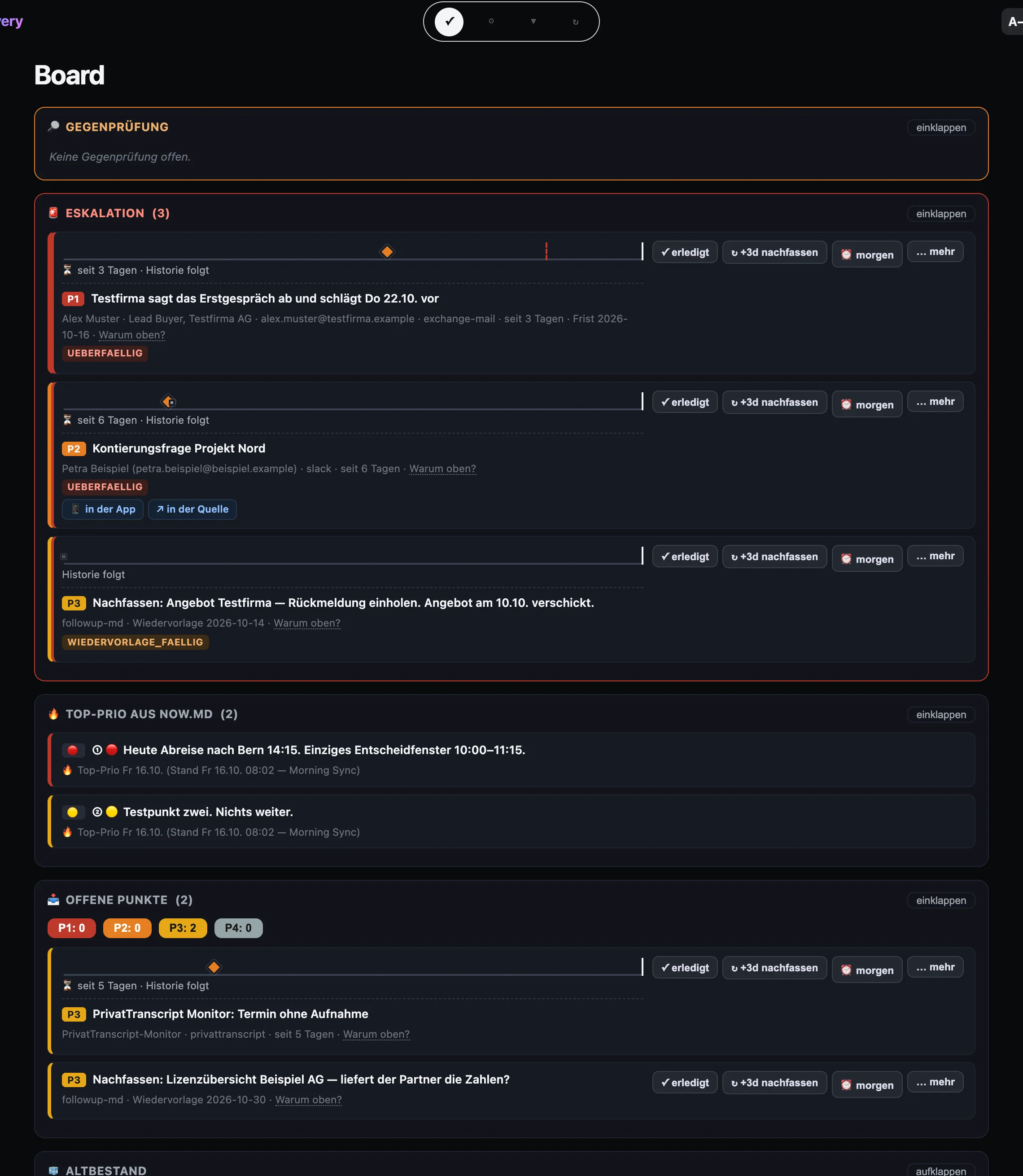
One state core, many surfaces
The core is a journal: every action is appended once, and the current state of each item follows from the sequence of actions. The surfaces calculate nothing themselves. They show what the core says and report back what someone did.
Live instead of a sync run
The surfaces hold an open connection to the core and receive every change as it happens. A surface that was offline for a while picks up exactly the events it missed, rather than the whole list. The Mac app shows in the menu bar since when the connection has been live, and reports new P1 items and overdue ones as notifications.
Locks, deliberately simple
Whoever opens an item borrows it for 90 seconds. Other surfaces show it greyed out with a note on where it is being worked on. The loan extends while someone is working and expires on its own when a device dies. Every change is also checked against the version the surface had in view.
Priority you can explain
Ranking and signals come from a single rule table. No surface calculates on its own, and the voice assistant will read out the same order that is on the screen. Each item can be unfolded to show which rule applied. Whatever you raise by hand stays up and is never overwritten by a later run.
Projection into your own knowledge store
The core writes every change of status back into your store, in the same format as before: completed with reason and timestamp, an entry in the completion log, a follow-up in the calendar sheet. Existing views and reports keep running, and the history stays where it will still be readable in five years.
Why is this at the top? The answer travels with the item
Prioritisation rarely fails because of the formula. It fails because the formula is calculated in three places in three different ways. In the core it exists once, in a versioned rule table, and it works in three stages.
| Stage | What it sets | What it is built from |
|---|---|---|
| Class | P1 to P4, the broad level of urgency, readable for everyone on the team | Set when the item is captured, from the importance of the contact, deadline, appointment and blockage. Can be changed by hand; the ranking never changes the class |
| Ranking | The order within a class | Weight of the class times urgency of the deadline, higher for important contacts and when the other side wrote last, dampened when an item has been shown often and never touched |
| Signals | What stands out on top: new and urgent, overdue, follow-up due, aged, cross-check open | Fixed thresholds: P1 overdue at once, P2 after two, P3 after seven, P4 after fourteen days; aged after fourteen days, old stock after 45. Board and notifications use the same table |
What you can do with an item
Every action lands in the journal, with timestamp and surface. Nothing is overwritten, everything can be undone.
Complete and follow up
Done closes the item. Follow up in three days closes it and creates a follow-up three days later, a follow-up date puts it on a day of your choice.
Set aside
Tomorrow or set aside until a date hides an item until then. Afterwards it is back on the board.
Discard with a reason
Discarding requires a reason. Completed and discarded items can be brought back with reopen.
Send replies
The reply suggestion from the capture sits in the item. You adjust it and send it with one click into the channel the message came from. The item is then done.
Cross-check
If the core finds evidence that an item is done, such as a reply that was sent, it asks: correct, done, or no, it stays open. Nothing is closed automatically.
Four views
Board, Today, Aged and Follow-ups. In Aged you decide for old items between done, waiting on purpose and discarded.
Class and note
The class can be set by hand and then stays as it is. A note records what you know about an item.
Mac app
The board in its own window, arrow keys to move between views, list of open items in the menu bar, counter in the Dock, text size adjustable.
iPhone
The board runs on the iPhone with every action, including the inputs for note, set aside until and discard.
The core runs inside your network
The open items say what your company is working on right now: which clients are waiting, which deadlines are pressing, where things are stuck. That is one of the densest summaries of a business there is. It does not belong in someone else's service.
| Runs on your own infrastructure | A small service on a server in the house or on a machine at a provider of your choice. No subscription that reads along with the state of your work, and no provider evaluating it. |
| Reachable only inside your private network | The surface cannot be reached from the open internet. Anyone working remotely comes in through the secured path into the company network that laptop and phone use anyway. |
| Content stays in your store | The core carries status, ranking and locks. Text, history and attachments stay where they already are and are never copied into a second database. |
| Every action traceable | The journal records who did what, when and on which surface. Nothing is overwritten, everything can be reversed, and the history of an item stays readable. |
| Nothing disappears by itself | Discarding is an action with a reason and can be taken back. An item may age and move into the grace view, yet it is never deleted automatically. |
| Honest limits | A board does not replace a decision. It makes sure the decision is taken on the right item, and that it has to be taken only once. |
Where the data sits
- State
- Journal and derived view in the service on your infrastructure
- Content
- In your knowledge store, read by the core only
- Write back
- Status, completion log and follow-ups in the familiar format
- Access
- Only from your private network, no path from the open internet
- Audit trail
- Every action with timestamp, surface and reason, reversible
- Language models
- The core uses none. Reply suggestions are drafted at capture, not in the core
No additional cloud service between your devices and your open items. If the connection to the outside fails, the board keeps working inside your own network.
As a project in three steps
Clarify sources and rules
Which channels create open items, which of them belong on a shared board, and which rules decide the order? The result is a first version of the priority table, written in words everyone on the team understands and can look up.
Put the core into operation
The service moves onto your infrastructure, reads in the existing items and writes the status back into your store. In this phase it runs alongside the current path, so both states can be compared.
Connect the surfaces
Browser, phone, voice assistant and the existing automations move onto the same core, one after the other. Once they all hang on it, the old reconciliation falls away. The rules are then tuned on real items rather than on paper.
The place where the commitments come together
Meetings produce commitments: PrivatTranscript records them in the minutes, PrivatActions carries them on as open items. The activity cockpit and the digital assistant read the same core instead of keeping lists of their own. And wherever a draft reply comes from an external language model, PrivatPrompt can sit in front of it and mask whatever must not leave the house.
Target picture of all solutions →The summary as a PDF
Four lists and one board, the priority rules with follow-ups, the state core with its surfaces, data handling on your own infrastructure and the three-step introduction, compact for the decision paper.
PrivatActions
One tick that counts everywhere: board, priority rules, state core, surfaces and data handling on three pages.
How many lists of open items do you keep in parallel today?
In a first conversation we count the places where a tick is set in your organisation, and clarify which of them could become a single one. No obligation, on equal terms.
Get in touch → All solutions